Happy Lunar New Year!
I would like to start out this Lunar New Year with a simple question. What would you like at your fingertips? I have pondered this question for a while. I have come up with all kinds of visions of things I would like, and submitted comments and suggestions to vendors and the world. A couple of days ago, I realized, I can actually make a lot of it happen. Today's cell phones are a little bit better than the older ones used to be.
I have started to follow the Beginning iPhone Programming Tips posted by TimesToCome. Learning a new language seems like a relatively high price to pay. That being said, I remember lots of really cool things that I would have loved to have handy earlier. There were lots of things that I kept close, checked often, and worried about more often.
Now, I am planning on implementing some of those. I would also be happy to have any suggestions. What kinds of information are you looking for? What kinds of information do you check often? What would you like your phone (iPhone at first) to do? How long do you think it will take me to have my first application?
Jacob
Tuesday, January 27, 2009


Tuesday, January 13, 2009
Her Stroke of Insight
In the later part of last year, I was working on improving my presentation skills. I was reading about presentations and great presenting. I cannot remember if it was Guy Kawasaki or a talk on Presentation Zen
by Garr Reynolds. Guy turned me on to Garr and an author's talk he did at Google on Presentation Zen. Along the way, several people have also pointed me towards TED (Technology, Innovation, Design). One of the best talks that I have watched on TED was "My Stroke of Insight" by Jill Bolte Taylor:
After watching this presentation, I purchased and read the book under the same name, My Stroke of Insight: A Brain Scientist's Personal Journey. She has turned something that most people would find very crippling into a source of knowledge and strength. Along the way, she also used her education as a brain researcher to help gain better understanding about how the brain works. I find this particularly interesting.
She found out how hard it is to build a plan and stick to it when the narrator in the brain is not working. When your inner voice, that helps plot and plan, is no longer available. This would be a lot like how my Artificial Life forms live. I am not yet sure how to incorporate that inner voice into my creatures, but wow, it would be great to have them.
Right now, without that narrative, my creatures are living in the moment. At each moment, they need to make a plan, analyze the situation, and take a course of action. At the next moment, they don't really have much information about the plan that they were following previously. There are some clues, but they are pretty weak.
One thing I picked up from the book is the length of time for a physiological response. After something happens or you first become aware of it, your body physically responds for a bout 90 seconds. You are afraid, or angry, or happy, or whatever for 90 seconds. After that period, you can choose your reaction again. You can choose how you feel. You can ignore your initial physical reaction to something for 90 seconds and then it gets easier. This is very good to keep in mind when your child does something particularly harsh or someone does something that sets you off for some reason. Just wait 90 seconds, pretend it is all good, and in 90 seconds, it will be easier to let it go. I have used this insight to get past some really painful or frustrating things, and also to help change what I think about.
Jill described telling her brain something on the order of "yes, that is very nice, we are going to stop having that kind of thought now" and having it work. I have had a decent amount of success with this technique. Why did it take reading a book about someone's experience during and recovering from partial brain death for me to consider talking to my brain? I know it sounds weird, but have you tried it? Ask your brain to do something or not do something. Really ask it. You might be surprised.
Another thing that I found really scary was Jill's description of what it was like to be in the hospital after a stroke. She wanted people to speak slowly and quietly. She needed a lot of time to form a response to a question. The doctors or nurses ended up thinking that she was incapable due to her reaction to bright lights and loud questions or the amount of time it took her to come up with a response.
It still amazes me how adaptive a human body and human brain are. She lost a lot. By working on getting back pieces and stretching a little bit more each day, she gained a lot of it back. Yes, in the end, she is not the same person. But, if she had listened to common wisdom, she would have been an invalid for life with never expanding horizons. Believe in what your body and brain can do. Give them a chance.
To Jill, who went through a massive breakdown and turned it into genius: Thank You!
Jacob

by Garr Reynolds. Guy turned me on to Garr and an author's talk he did at Google on Presentation Zen. Along the way, several people have also pointed me towards TED (Technology, Innovation, Design). One of the best talks that I have watched on TED was "My Stroke of Insight" by Jill Bolte Taylor:
After watching this presentation, I purchased and read the book under the same name, My Stroke of Insight: A Brain Scientist's Personal Journey. She has turned something that most people would find very crippling into a source of knowledge and strength. Along the way, she also used her education as a brain researcher to help gain better understanding about how the brain works. I find this particularly interesting.
 . She has turned something that most people would find very crippling into a source of knowledge and strength. Along the way, she also used her education as a brain researcher to help gain better understanding about how the brain works. I find this particularly interesting.
She found out how hard it is to build a plan and stick to it when the narrator in the brain is not working. When your inner voice, that helps plot and plan, is no longer available. This would be a lot like how my Artificial Life forms live. I am not yet sure how to incorporate that inner voice into my creatures, but wow, it would be great to have them.
Right now, without that narrative, my creatures are living in the moment. At each moment, they need to make a plan, analyze the situation, and take a course of action. At the next moment, they don't really have much information about the plan that they were following previously. There are some clues, but they are pretty weak.
One thing I picked up from the book is the length of time for a physiological response. After something happens or you first become aware of it, your body physically responds for a bout 90 seconds. You are afraid, or angry, or happy, or whatever for 90 seconds. After that period, you can choose your reaction again. You can choose how you feel. You can ignore your initial physical reaction to something for 90 seconds and then it gets easier. This is very good to keep in mind when your child does something particularly harsh or someone does something that sets you off for some reason. Just wait 90 seconds, pretend it is all good, and in 90 seconds, it will be easier to let it go. I have used this insight to get past some really painful or frustrating things, and also to help change what I think about.
Jill described telling her brain something on the order of "yes, that is very nice, we are going to stop having that kind of thought now" and having it work. I have had a decent amount of success with this technique. Why did it take reading a book about someone's experience during and recovering from partial brain death for me to consider talking to my brain? I know it sounds weird, but have you tried it? Ask your brain to do something or not do something. Really ask it. You might be surprised.
Another thing that I found really scary was Jill's description of what it was like to be in the hospital after a stroke. She wanted people to speak slowly and quietly. She needed a lot of time to form a response to a question. The doctors or nurses ended up thinking that she was incapable due to her reaction to bright lights and loud questions or the amount of time it took her to come up with a response.
It still amazes me how adaptive a human body and human brain are. She lost a lot. By working on getting back pieces and stretching a little bit more each day, she gained a lot of it back. Yes, in the end, she is not the same person. But, if she had listened to common wisdom, she would have been an invalid for life with never expanding horizons. Believe in what your body and brain can do. Give them a chance.
To Jill, who went through a massive breakdown and turned it into genius: Thank You!
Jacob
Amazon Kindle Review and Feature Requests
I have been spending way too much time on the Kindle. I just read this Kindle Review and had a few comments on it. Basically I agree with the review. The Kindle is a relatively early product with a few odd issues. The price is relatively high and it mostly makes sense for the impatient, frequent travelers, and/or avid book readers. Hrm, sounds like Americans to me (with the possible exception of the avid book readers part). There are now over 200,000 books available for the Kindle.
The fact that it does not have back lighting makes the display require far less power, as mentioned in the review. It also does another thing though. The lack of backlighting decreases eye strain. I used to print lots of stuff in order to be able to read it without my eyes getting tired. Now, I can send it to my Kindle with a simple email message and read it there without having to burn more paper. One nice way to make up for the lack of backlighting is to purchase a clip on light for it. Here is a simple clip on light that works pretty well. It is a bit bright though, so if you want to read next to a very light sensitive person, this may not be the one for you.
There are a few things that I would love to see the Kindle and/or Amazon support:
- Please let me share documents with my family. I would love to be able to share a book with a friend or family member, temporarily giving up my right to view it. My preference would be to still allow for searches, still show it in the list, and give me the ability to request it back from the other person. I am fine with waiting until it is removed from my device for them to be able to get it and removed from their device before I can get it back. DRM is secure and I can share books.
- Allow for Kindle focused reviews. People say all kinds of wonderful things in the reviews for a book that is available in the Kindle store, but sometimes, when you get the book, the formatting or images are terrible. I have noticed (and blogged) that there is a huge difference in the quality and usability of the books based on the formatting effort put in by the publisher. I would love to be able to say this book was a hit, wish I could read the diagrams.
- It would also be nice to have a glow option for the kindle (like the Timex Indiglow(TM).)
Friday, January 9, 2009
Seven Things Meme...
Thanks to Jason Sweat, I was tagged with the "Seven Things" meme.
I would like to tag:
Oh, and the rules: Mention the person who tagged you, post seven things people might not know about you, then tag seven more people and let them know via post to their blog or mention on twitter.
Jacob
- My first computer was a Commodore Vic 20.
- I learned basic with my brother. We miss-typed the commands needed to load a program we had typed in and the error message was not consistent. Eventually, we started to figure out the key commands through trial an error. We were as far as peek and poke when we went out and purchased a book. Yes, we randomly tried words and actually found peek and poke. Really.
- My first paid programming job was when I was 13 or 14. It was with a partner that was facilitating the hardware needed to build and deploy the system.
- My first online ID was Wishmaker. I was put on the spot and the owner of the site asked me what I liked to do. I like making people's wishes come true, hence "wishmaker". I am still known as wishmaker or TheWishmaker on many sites.
- I cringe whenever scenes in movies mention torture, pliers, and finger or toenails, from personal experience.
- Finding more people to tag is actually possibly going to be harder than coming up with the facts to share. (and no, I am not counting this fact)
- An off duty police officer in the US can get from his house all the way to squealing his tires in pursuit in about 30ish seconds. One of my friends, named Jason, but not related to the tagger above, thought it would be a good idea to "salute" said officer with both of his middle fingers. One a positive note, while he and his friends pursued us for over 30 minutes, they did not catch us.
- Sun described my architecture as having "near linear scalability". Their tests actually showed what the architecture was designed for, linear scalability.
I would like to tag:
Oh, and the rules: Mention the person who tagged you, post seven things people might not know about you, then tag seven more people and let them know via post to their blog or mention on twitter.
Jacob
Kindle Takes a Dive and Publishing Quality Books
I have been surprised at how much I use the Kindle, and the kinds of issues that I find. Some of the issues are good, some are bad. First, let me start out on a positive note. The other day, I was paying for something and managed to drop what I had in my hands and in a reflex action, drop my Kindle as well. I quickly picked it up and looked at it. It looked fine at first glance and was showing what I had been looking at. I finished up at the register and sat down to take a closer look. It turned out that when hitting the tile from about 4 feet up it had popped part of the case open. A slight bit of pressure snapped the case closed again. If you look really closely, you can see a small bend in the seam. I was quite happy and figured that the Kindle took the fall quite well. Then, I tried to turn the page. To my horror, the UI did not change. At this point, I remembered that the Kindle did not require any power to keep the UI looking the same. I was now worried that it was completely dead. I tried the lock/unlock keys. That did not work. At one point, it occurred to me that I might be able to hold down the lock/unlock keys. When I tried this, nothing seemed to happen. Then I noticed that the menu slider was growing up the side. I let go of the keys and it went back down. This time, I pushed the keys down and waited until the line made it to the top. A few tense seconds later, and my Kindle was perfectly happy and working normally. I do not, in any way, fault Amazon for those tense moments. I am quite happy that my device managed to make it unscathed through the drop. Modern product engineering for tech toys seems very good compared to the older products I remember.
As I have previously discussed, some of the books available on Kindle are well formatted and some of them are not. I have looked a little further in a few books that I have read. I have also looked a little bit online. It appears that the Kindle eats source code when processing contents. I think it is the Kindle's built in support for HTML at play. Anything that looks like an open tag is suspect. In one of the two books I have just completed: Clean Code: A Handbook of Agile Software Craftsmanship (Robert C. Martin Series) I noticed that many sections of code would not compile. I started to pick up the pattern pretty quickly. In source code, you have to be very careful to tell the Kindle to not apply formatting to it. If you don't, you will get odd results.
In section G33 at the end of the book, there is a piece of code:
Since I am working on a book that I would like to publish and have available soon, I started to look into what it would take to get the book formatted correctly on the Kindle. I did find this quick overview of Kindle Formatting. I guess this answers one of the questions that I had earlier. Why aren't all books available for Kindle? It is probably really easy for most companies to publish their books to Kindle. Making the book look good on the Kindle might require some effort.
I have also just finished reading "Aiming at Amazon", which is a self publishing guide for publishing books for the Amazon market. This was a really good book. I look forward to finding out if the tips and techniques still apply today. Did you know, that if you are updating a print-on-demand book, it will show up as "out of stock" while you are proofing? Has anybody out there setup a self-publishing operation?
Jacob
As I have previously discussed, some of the books available on Kindle are well formatted and some of them are not. I have looked a little further in a few books that I have read. I have also looked a little bit online. It appears that the Kindle eats source code when processing contents. I think it is the Kindle's built in support for HTML at play. Anything that looks like an open tag is suspect. In one of the two books I have just completed: Clean Code: A Handbook of Agile Software Craftsmanship (Robert C. Martin Series) I noticed that many sections of code would not compile. I started to pick up the pattern pretty quickly. In source code, you have to be very careful to tell the Kindle to not apply formatting to it. If you don't, you will get odd results.
In section G33 at the end of the book, there is a piece of code:
if(nextLevel tags.length)I believe this should have a '<' but it was stripped out:
if(nextLevel < tags.length)This is not a big thing, but when you start to encounter tables and images that you cannot zoom, hyphens where they should not be, and missing pieces of code in a book about clean code, it starts to get a little frustrating.
Since I am working on a book that I would like to publish and have available soon, I started to look into what it would take to get the book formatted correctly on the Kindle. I did find this quick overview of Kindle Formatting. I guess this answers one of the questions that I had earlier. Why aren't all books available for Kindle? It is probably really easy for most companies to publish their books to Kindle. Making the book look good on the Kindle might require some effort.
I have also just finished reading "Aiming at Amazon", which is a self publishing guide for publishing books for the Amazon market. This was a really good book. I look forward to finding out if the tips and techniques still apply today. Did you know, that if you are updating a print-on-demand book, it will show up as "out of stock" while you are proofing? Has anybody out there setup a self-publishing operation?
Jacob
Wednesday, December 31, 2008
How To Set Your Baby Down Without Waking Them Up?
I have found an interesting technique that allows me to set my baby down into a crib or bed without waking him up. Typically, if I get my baby to sleep in my arms, he will wake up when I lay him down. All new parents know how frustrating this can be. It can be particularly daunting when they are teething and being awake means discomfort and crying.
I started thinking about what might be happening to wake them up. My first thought was that changing the angle they were on, from vertical to horizontal, was the issue. With my first child, I would carefully sit down in bed up against some pillows and slowly lower down until they were horizontal. This would take a long time and would still frequently wake the baby up.
Recently, I wondered if it might be the change in pressure when setting the child down. Here they are, in a nice comforting hug basically with pressure on their stomachs, chest, legs, ... and when they are set down, they are on a harder surface, and that comforting presence is removed.
Now what I do, is carefully set the baby down. I do not worry about them waking a bit and opening their eyes. That is sadly bound to happen. I then put both of my hands on their chest with fingers splayed and press about the same amount that they were getting when over my shoulder. Please make sure that you do not press too hard. This should basically be a reassurance that you are there and love them. I then keep pressing for a few seconds. The moment the baby relaxes again, I put a blanket on and walk off leaving a peacefully sleeping baby behind. No crying, no fuss, just a happy content baby.
Please let me know if this works for you, or what you do to get your baby down to sleep.
Happy New Year!
Jacob
Tuesday, December 30, 2008
How to Zoom on Amazon Kindle
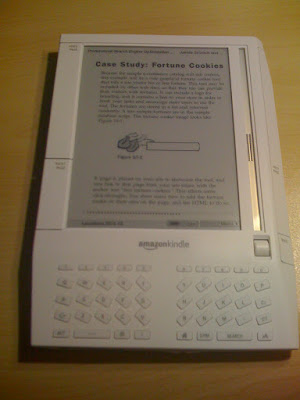
As many of you know, I am a fan and user of the Amazon Kindle. I have been reading lots of books on it recently (roughly 2-5 per week). When reading books with tables and images, I frequently find that they are too blurry to read. For some reason the font does not make solid lines. I am assuming there is not enough supported shades of gray to be able to draw the appropriate shape. Recently, I was trying to transfer a table off of the kindle by "Save Page as Clipping" or "Add Highlight". I found the context sensitive menu on the right had a "Zoom" option. When you "Zoom" an image or table, it frequently rotates to be in landscape mode and makes the image or table larger. Images and tables that have been "Zoom"ed on the Kindle are much easier to read. Here is a quick example of how to "Zoom" an image from Professional Search Engine Optimization with PHP: A Developer's Guide to SEO I have been enjoying this book. It is a great combination of SEO (Search Engine Optimization) advice, introductory material, and an explanation of how to actually implement solutions with code samples. Thank you: Jaimie Sirovich and Cristian Darie.
I start on a page that has an image that I would like a clearer look at:
 Move the scroll wheel up to the position of the image:
Push the scroll wheel and select "Zoom" from the menu: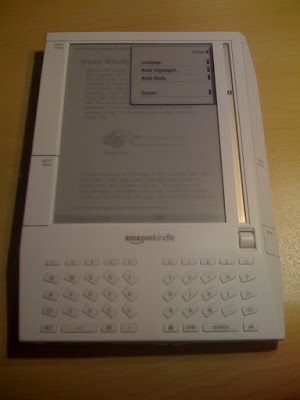
And then enjoy the "Zoom"ed image: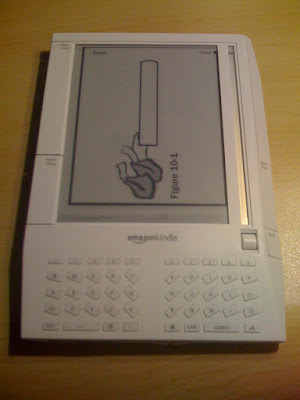
When looking for an example to snap pictures of, I found out that not all images or tables work this way. For the books purchased on Amazon, the ones that I have tried have worked. For the documents that I have sent myself using their email conversion, I have yet to see one work.
Hope this helps people enjoy their readers more. Lack of definition of images and tables was one of the few things that I did not like about my Kindle. I am very glad that they have this feature in the Kindle today. For what it is worth, I am running the latest version of the Kindle software as well. To upgrade, connect to wireless and put the thing to sleep using "ALT+aA".
**update** Sadly, one of the books that I purchased for the Kindle does not have zoom support. It looks like this might only work if people do some special formatting.
Jacob
I start on a page that has an image that I would like a clearer look at:
 Move the scroll wheel up to the position of the image:

Push the scroll wheel and select "Zoom" from the menu:

And then enjoy the "Zoom"ed image:

When looking for an example to snap pictures of, I found out that not all images or tables work this way. For the books purchased on Amazon, the ones that I have tried have worked. For the documents that I have sent myself using their email conversion, I have yet to see one work.
Hope this helps people enjoy their readers more. Lack of definition of images and tables was one of the few things that I did not like about my Kindle. I am very glad that they have this feature in the Kindle today. For what it is worth, I am running the latest version of the Kindle software as well. To upgrade, connect to wireless and put the thing to sleep using "ALT+aA".
**update** Sadly, one of the books that I purchased for the Kindle does not have zoom support. It looks like this might only work if people do some special formatting.
Jacob
Subscribe to:
Posts (Atom)


 Posts


